In the demanding world of academia and professional research, few tasks evoke as much dread as managing citations. You've poured hours into your research, meticulously crafted your arguments, and polished your prose. Now comes the moment of truth: accurately crediting every source. Miss a comma, misplace a bracket, or omit a date, and your credibility can take a hit. It's not just about avoiding plagiarism; it's about demonstrating intellectual honesty, supporting your claims, and allowing others to follow your scholarly trail. This is where mastering how to effectively use Harvard citation generators becomes not just helpful, but essential.
Think of it: dozens of sources, each needing precise formatting for in-text citations and a comprehensive reference list. The sheer volume can be overwhelming, leading to last-minute panic and avoidable errors. But what if you could streamline this process, significantly reduce mistakes, and reclaim valuable time, all while ensuring your work meets the highest academic standards? Harvard citation generators promise this efficiency, but like any powerful tool, they require a discerning hand and a clear understanding of their mechanics and limitations.
At a Glance: Your Quick Guide to Harvard Citation Generators
- Harvard Essentials: Understand the core author-date system, distinguishing in-text citations from the full reference list.
- Generators Defined: These are online tools that automate the formatting of source details into Harvard style.
- Key Benefits: Time-saving, error reduction, consistency, and a helpful learning aid.
- Step-by-Step Use: Select source type, input details, generate, copy, and—crucially—verify.
- Common Pitfalls: Garbage in, garbage out; inconsistent capitalization; missing details; not accounting for all Harvard variations.
- Beyond Automation: Always double-check generator output against a trusted style guide.
- Academic Integrity: Generators are tools; responsible citation is your ethical obligation.
Why Harvard Matters: A Quick Primer on Academic Rigor
Before diving into the tools, let's ground ourselves in why Harvard referencing is so vital. It's a widely adopted "author-date" system, serving as a universal language for acknowledging intellectual contributions. When you cite in Harvard style, you're not just adhering to a rule; you're participating in a scholarly conversation, building upon existing knowledge, and giving due credit where it's earned.
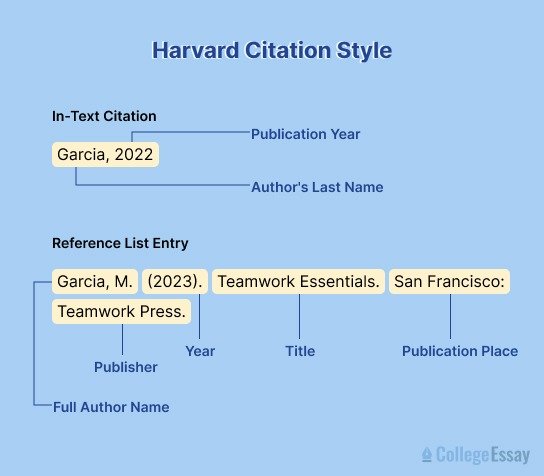
This system has two main components:
- In-text citations: These are brief acknowledgments, usually the author's surname and the year of publication (e.g., (Cox, 2001)), placed directly within your written work. For direct quotes, a page number is added (e.g., (Johnson, 2019, p. 45)).
- The Reference List: This is a comprehensive, alphabetized list at the end of your document, providing full bibliographic details for every source you've cited. It allows your readers to easily locate and verify your sources.
While there's no single "official" Harvard manual—it's more of a family of styles—many institutions base their guidelines on authoritative texts like the 11th edition of Cite Them Right. The underlying goal is always the same: clarity, consistency, and accountability.
The Core Principles of Harvard Referencing: The Rules of the Game
To effectively use any citation generator, you first need a solid grasp of the foundational rules it's designed to implement. Without this understanding, you're merely pushing buttons without comprehending the logic behind the output.
Mastering In-Text Citations
These are your quick nods to sources within the body of your text:
- Basic Format: (Author's Surname, Year). Example: Research shows a clear trend (Smith, 2020).
- Author in Sentence: If you mention the author's name in your sentence, only the year is needed in brackets. Example: Smith (2020) argues that the trend is clear.
- Direct Quotes: Always include a page number. Example: "The trend is undeniable" (Smith, 2020, p. 78). For block quotes (over a certain word count, typically 40), indent the quote and omit quotation marks, but still cite.
- Multiple Authors:
- Two or Three: List all surnames (e.g., (Jones & Miller, 2222) or (Jones, Miller & Brown, 2023)).
- Four or More: Use the first author's surname followed by 'et al.' (Latin for "and others"). Example: (Raab et al., 2015).
- No Author: Use the title (or a shortened version) and year. Example: (A Study of Trends, 2021).
- No Date: Use 'n.d.' (no date). Example: (Thompson, n.d.).
Crafting Your Reference List
This is where the generator really shines, but it's your responsibility to provide the correct raw data and ensure the final output is perfect.
- New Page, Alphabetical Order: Your reference list always starts on a new page and is organized alphabetically by the first author's surname. If no author, alphabetize by the first significant word of the title.
- Author Initials: Use only initials for given names, without full stops or spaces between them (e.g., J.K. Rowling becomes Rowling, JK).
- No Footnotes/Endnotes: Harvard relies solely on in-text citations and the reference list.
- Italics for Titles: Crucially, italicize the titles of freestanding works (books, reports, theses, journal names, websites) but not the titles of articles, chapters, or web pages within those larger works.
- Capitalization:
- Book/Report Titles: Capitalize only the first letter of the title, the first letter of the subtitle (if any), and proper nouns.
- Journal Titles: Capitalize the first letter of all main words.
- Place of Publication/Publisher: Capitalize the first letter of each.
Understanding these distinctions is paramount. A generator can format, but it can't read your mind about what type of source you're inputting.
Enter the Harvard Citation Generator: Your Academic Sidekick
Imagine manually typing out every single reference, meticulously checking punctuation, italics, and capitalization for dozens, even hundreds, of sources. That's the pre-generator reality many faced. Today, a harvard style citation generator acts as your personal bibliographic assistant, automating much of this painstaking work.
What Are They?
Harvard citation generators are online tools (or sometimes integrated into word processors/research software) that take the raw data about your source—author, title, year, publisher, URL, etc.—and automatically arrange it into the correct Harvard reference list format. They leverage algorithms designed to follow the widely accepted rules of Harvard referencing, saving you from remembering every nuanced detail.
Why They're Invaluable
- Time-Saving: This is perhaps their greatest benefit. What once took minutes per source now takes seconds.
- Ensures Adherence: They significantly reduce manual formatting errors, ensuring consistent punctuation, italics, and layout.
- Maintains Consistency: All your citations will look uniform, crucial for a professional and academically sound document.
- Minimizes Errors: Forget misplaced commas, incorrect author order, or forgotten access dates.
- Supports Variety: Most generators can handle a vast array of source types, from books and journal articles to podcasts and social media posts.
- Aids Learning: By seeing how sources are consistently formatted, you implicitly learn the structure and rules of Harvard referencing over time.
Your Step-by-Step Guide to Using a Citation Generator
Using a generator effectively is a straightforward process, but it requires your active engagement, not just passive reliance.
1. Select the Correct Source Type
This is the most critical first step. A book reference looks very different from a website reference or a journal article reference.
- Be Specific: Don't just pick "online source" if it's an online journal article. Look for "Journal Article (Online)" or similar.
- Common Types: Books, journal articles, websites, newspaper articles, theses, social media posts, videos, images, reports, and legal documents are frequently supported.
2. Input the Required Source Details
Once you've selected the source type, the generator will prompt you for specific pieces of information. This is where "garbage in, garbage out" comes into play. You must enter accurate and complete data.
- Author/Editor: Identify all authors. For edited books, distinguish between author and editor. If an organization is the author, use that name.
- Year of Publication/Last Update: Find the most recent, relevant date.
- Title: The full title of the specific article, chapter, or web page.
- Source Title: The title of the larger work it's part of (e.g., the book title, journal title, website name).
- Publisher/Journal Name: Where the work was published.
- Place of Publication: For books, often city and country.
- Volume/Issue/Page Numbers: Crucial for journal articles.
- DOI (Digital Object Identifier): A unique alphanumeric string for online articles, preferable to a URL when available.
- URL: The direct link to the source if accessed online.
- Access Date: The date you last accessed the online source. This is vital because web content can change or disappear.
3. Generate the Citation
With all fields filled, simply click the "Generate" or "Cite" button. The tool will instantly produce a formatted reference.
4. Copy and Paste (Then Verify!)
Copy the generated citation. Paste it into your reference list, ensuring it's in alphabetical order.
Crucially, this is not the end of the process. Never blindly trust the output. You are ultimately responsible for the accuracy of your citations.
Common Source Types: What to Input Where
Let's look at how typical sources map to generator input, with examples following the structure outlined in Harvard guides like Cite Them Right.
Book: Author/editor, Year, Title, Place: Publisher.
- Input: Author(s), Year of publication, Full title (and subtitle), Place of publication, Publisher.
- Example: See, M. (2012) Greenhouse gas emissions: Global business aspects. Berlin, Germany: Springer.
Journal Article (Online): Author, Year, 'Title of article', Title of journal, Volume(Issue), pp. Page numbers. Available at: DOI or URL (Accessed: date).
- Input: Author(s), Year, Article title, Journal title, Volume number, Issue number, Page range, DOI (preferred) or URL, Date accessed.
- Example: Norrie, C. et al. (2012) 'Doing it differently?' A review of literature on teaching reflective practice across health and social care professions', Reflective Practice, 13(4), pp. 565-578.
Website (with Organization as Author): Organisation Name (Year) Title of web page. Available at: URL (Accessed: date).
- Input: Organization name (as author), Year published/last updated, Title of the specific web page, Full URL, Date accessed.
- Example: National Health Service (2018) Check your symptoms. Available at: https://www.nhs.uk/conditions/ (Accessed: 15 July 2023).
Thesis (Online): Author, Year of submission, Title of thesis. Degree statement. Degree-awarding body. Available at: URL (Accessed: date).
- Input: Author, Year of submission, Full title of thesis, Degree level (e.g., Doctoral thesis, Master's thesis), Awarding university, URL (if online), Date accessed.
- Example: Pradhan, S. (2021) Impacts of road construction on landsliding in Nepal. Doctoral thesis. Durham University. Available at: http://etheses.dur.ac.uk/14022/ (Accessed: 10 August 2023).
Social Media Post: Author (account holder/poster), Year posted, 'Title of post', [Platform], Day/month, Available at: URL (Accessed: date).
- Input: Author (individual or account name), Year, Content/Title of post (first few words or description), Platform (e.g., Instagram, X/Twitter), Day/Month of post, URL, Date accessed.
- Example: VeganArtShare (2021) 'Tiny dancer of the sea.' [Instagram]. 25 June. Available at: https://www.instagram.com/p/CQh4z7vM0Xw/ (Accessed: 18 July 2023).
Pitfalls and Potholes: Where Generators Can Go Wrong
While citation generators are powerful, they're not infallible. Being aware of their limitations and common errors will empower you to use them more effectively.
1. "Garbage In, Garbage Out"
This is the golden rule. If you feed the generator incomplete or incorrect information, its output will reflect those flaws. Double-check every detail you type into the fields. A typo in the author's name or the year will lead to an incorrect citation.
2. Missing Information (n.d. for No Date)
Sometimes, sources genuinely lack a publication date, especially older websites or certain reports. A good generator will correctly use "n.d." (no date) in such cases. However, some generators might simply omit the date entirely, which is incorrect. Always verify. If you can't find a date, use 'n.d.' yourself when prompted, or manually add it if the generator omits it.
3. Inconsistent Capitalization
Harvard style has specific capitalization rules: book titles usually only capitalize the first word and proper nouns, while journal titles capitalize all main words. Some generators, especially simpler ones, might over-capitalize everything, treating all titles like proper nouns or standard sentence capitalization. You'll need to manually correct this. For example:
- Generator output: How To Effectively Use Harvard Citation Generators For Flawless Referencing
- Correct Harvard: How to effectively use Harvard citation generators for flawless referencing (assuming it's a book title)
4. Incorrect Author Order or "et al." Usage
For sources with multiple authors, ensure the generator correctly lists them or applies "et al." where appropriate (typically four or more authors, but check your institution's specific guidelines). Some generators might struggle with very long author lists or might not correctly abbreviate.
5. Incomplete URLs or Missing Access Dates
Online sources require a working URL and an "Accessed:" date. These are critical for traceability, as web content is dynamic. Ensure the URL is complete and that the access date is present and accurate. Sometimes, generators might miss adding the "Available at:" or "Accessed:" phrase, requiring manual insertion.
6. Failure to Alphabetize the Reference List
Most generators create individual citations. They do not automatically alphabetize your entire reference list. That's a post-generation task you must perform in your word processor.
7. Different Harvard "Flavors"
As mentioned, there isn't one single Harvard style. Institutions might base their guidelines on Cite Them Right, but even then, there can be slight variations (e.g., punctuation differences, inclusion of specific elements). A generator follows a general Harvard standard, which might not perfectly align with your university's exact interpretation. Always cross-reference with your institution's official referencing guide.
Beyond the Click: Best Practices for Flawless Referencing
Effective use of citation generators means going beyond simply clicking a button. It involves strategic thinking, diligent review, and a commitment to understanding the underlying principles.
1. Always Double-Check (The Non-Negotiable Step)
Think of the generator as a very efficient first draft creator. Your job is to be the meticulous editor. After generating each citation, compare it against:
- The original source: Does the author's name match? Is the year correct? Is the page range right?
- Your institution's style guide: Does it conform to the specific Harvard variant your university requires? Pay close attention to italics, capitalization, and punctuation.
2. Understand the Style, Don't Just Rely
The best users of citation generators are those who also understand the Harvard style themselves. This knowledge empowers you to:
- Spot errors: You'll quickly identify when a generator has made a mistake.
- Handle exceptions: For unusual source types the generator might struggle with, you'll know how to manually format them.
- Make informed decisions: When information is missing, you'll know the correct protocol (e.g., 'n.d.').
3. Consistency is Key: Stick to One Generator or Style Guide
Don't jump between different citation generators or different interpretations of Harvard. Choose one reliable generator and cross-reference its output with a single, authoritative style guide (preferably your institution's). Inconsistency in formatting can be just as problematic as outright errors.
4. Manage Your Sources as You Research
Don't wait until the last minute to compile your references. As you gather information:
- Keep a Running List: Create a draft reference list from day one.
- Collect All Details: When you find a source, immediately note down all the information you'll need for a citation (author, year, title, publisher, URL, access date, page numbers, etc.). This makes inputting into the generator much faster and prevents scrambling later.
- Use Reference Management Software (Optional): For large projects, consider tools like Zotero, Mendeley, or EndNote, which integrate citation generation and source management more comprehensively.
5. Leverage In-Text Citations Manually
While generators excel at the reference list, your in-text citations often need dynamic management based on your sentence structure and quoting practices. Generators typically don't assist with this in real-time. Practice integrating author-date citations smoothly into your prose.
6. Back Up Your Work
Always save your document, and specifically your reference list, frequently. Technology can fail, and redoing a meticulously corrected reference list is a nightmare.
The Unseen Benefits: Why Mastering Citation Is More Than Just Avoiding Plagiarism
Beyond the immediate goal of passing your assignment, mastering proper citation, with or without a generator, cultivates essential academic and professional skills:
- Building Credibility: A perfectly cited work signals to your readers (professors, peers, clients) that you are thorough, professional, and knowledgeable. It lends authority to your own arguments.
- Strengthening Arguments: Each citation acts as an evidentiary anchor, showing that your claims are not just opinions but are supported by established research or expert perspectives.
- Enabling Further Research: A well-structured reference list allows other researchers to easily trace your sources, verify your findings, and build upon your work, fostering the collaborative nature of scholarship.
- Demonstrating Academic Rigor: It showcases your ability to engage critically with existing literature, synthesize information, and present it transparently. This is a hallmark of good scholarship.
- Developing Attention to Detail: The precision required in citation translates to other aspects of your work, honing your ability to focus on detail and accuracy—a valuable skill in any field.
Your Journey to Citation Confidence Starts Now
Harvard citation generators are not a magic bullet that absolves you of all responsibility. Instead, they are powerful accelerators, designed to take the grunt work out of formatting, allowing you to focus on the intellectual substance of your writing. By understanding the core principles of Harvard referencing, knowing how to accurately feed information into the generator, and committing to meticulous review, you can transform the daunting task of citation into an efficient, almost effortless part of your writing process.
Embrace these tools, but never outsource your critical thinking. With practice and diligence, you'll not only produce flawless reference lists but also deepen your understanding of academic integrity and the rich tapestry of scholarly communication. Your journey to citation confidence begins with that very next source you choose to cite.